The best CMS for universities in 2026 is the one that fits how your institution actually operates, not the one with the longest feature list.
- Higher ed CMS requirements have changed. Federal accessibility deadlines, AI search and rising student expectations have raised the bar for what a university website needs to do.
- Governance is the silent dealbreaker. Most institutions don't fail at picking a CMS. They fail at running it across dozens of departments without brand drift, content debt or compliance gaps.
- Integration matters more than aesthetics. Your CMS has to play nicely with your SIS, CRM, catalog and student communication tools, or it becomes another silo.
- Purpose-built beats general-purpose for higher ed. Generic platforms can be bent into shape, but the workarounds compound, and the people maintaining them eventually leave.
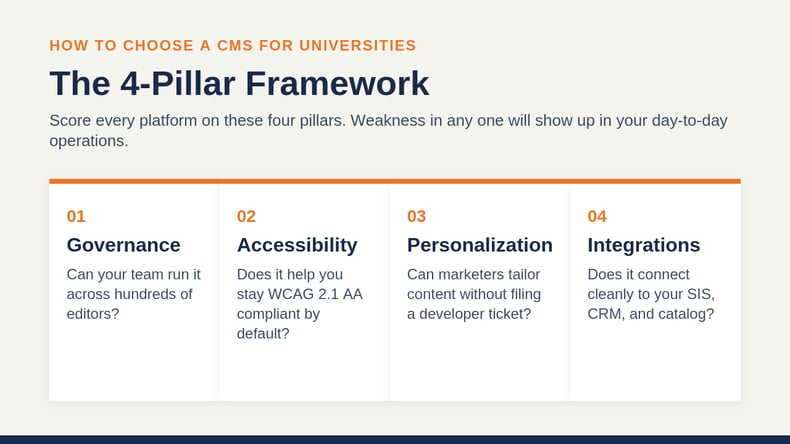
Evaluate every option against four pillars: governance, accessibility, personalization and integrations. Skip any one of them, and you'll be replatforming again in three years.
The pressure on higher education websites is immense, and the cost of getting your platform wrong is steep. Total postsecondary enrollment grew 1.0% in fall 2025, with shifts between institutional sectors reshaping where students are choosing to enroll. Students are choosing institutions, and deselecting them, based on their first few clicks.
Your website is the front door, brochure, application portal, catalog and chatbot. A content management system built for higher education needs to support all of that without breaking under the weight of dozens of departments, hundreds of programs and thousands of editors. The best CMS for universities enforces governance, protects accessibility compliance, surfaces personalized content and connects to the rest of your stack so that nothing falls between the cracks.
This guide will help you learn what higher ed CMS requirements look like in 2026, how to choose a CMS for universities using a four-pillar framework and what separates platforms that scale from those that stall.
What Makes the Best CMS for Universities Different in 2026?
A content management system, or CMS, is the software your team uses to create, edit, organize and publish web content without writing code from scratch. For institutions, that definition is just the starting point. A higher education CMS has to handle the kind of complexity that would crush a marketing tool built for retail or B2B SaaS.
Think about what your website actually does. It markets undergraduate programs to 17-year-olds and graduate certificates to working adults. It hosts faculty bios, research portals, alumni magazines, athletics calendars and tuition payment portals. It serves prospective students, current students, parents, donors, accreditors and the press. And it has to do all of that while staying on-brand, accessible, secure and current.
How Has the Higher Ed CMS Landscape Shifted?
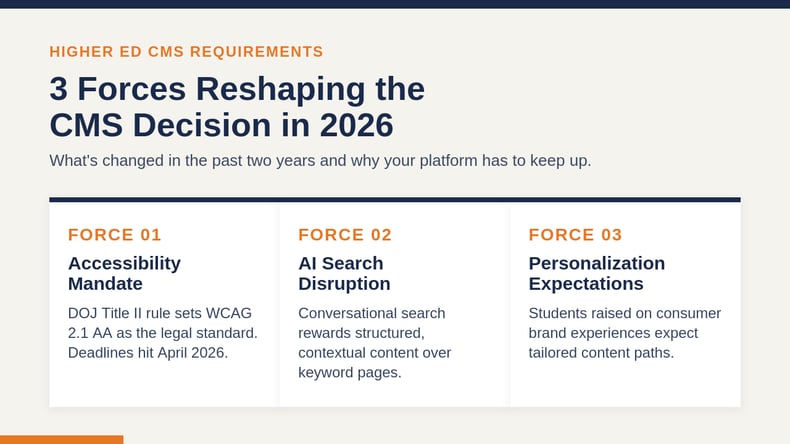
Three forces have reshaped what universities need from a CMS in the past two years.
First, accessibility moved from best practice to legal mandate. The Department of Justice's 2024 final rule under Title II of the ADA established WCAG 2.1 Level AA as the technical standard for public colleges and universities, with compliance deadlines of April 24, 2026 for institutions serving populations of 50,000 or more, and April 24, 2027 for smaller ones. Private institutions receiving federal funds face similar pressure under Section 504. If your CMS can't help you enforce accessibility at the editor level, you're inheriting risk every time someone publishes a page.
Second, AI search changed how prospective students find you. Conversational search through tools like ChatGPT, Perplexity and Google's AI Overviews rewards content that is well-structured, deeply contextual and clearly attributable. A CMS that produces clean semantic HTML, supports schema markup and lets your team publish question-and-answer-style content gives you a real advantage in this new search environment.
Third, students expect personalization. They've grown up with highly personalized digital experiences from the consumer brands they interact with daily, and many feel that higher education has been slow to catch up. That perception gap is your opportunity, but only if your CMS can deliver tailored content paths to different audience segments without months of custom development.
What Are the Higher Ed CMS Requirements You Can't Ignore?
Before you compare specific platforms, get clear on the non-negotiables. These are the higher ed CMS requirements that every serious university platform should meet in 2026.
Why Are Multisite Governance Tools a Must-Have?
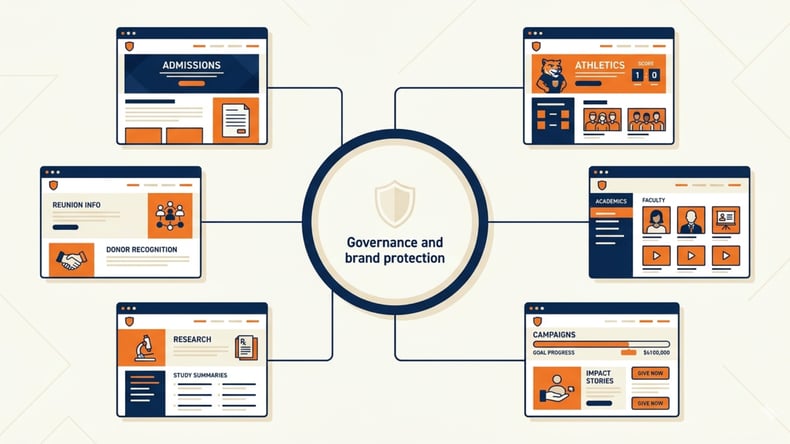
Most universities don't run one website. They run dozens, sometimes hundreds, of subsites for departments, programs, research centers, athletic teams, alumni chapters and microsites for specific campaigns. Without proper governance, this sprawl turns into duplicated content, inconsistent branding, broken links and security blind spots.
A modern CMS should give you centralized templates and global navigation while letting individual departments contribute content within guardrails. Look for role-based permissions, structured workflows and reusable content blocks that travel across sites. Decentralized contribution with centralized control is the only model that actually scales.
Why Does Accessibility Have to Be Built In?
Accessibility cannot be an afterthought added with an overlay widget. Legal pressure is real and growing, with thousands of accessibility lawsuits filed annually, and overlay tools have themselves become a target rather than a solution.
The best CMS for universities has accessibility checks integrated into the editing experience itself. That means automated scans for missing alt text, improper heading hierarchies, insufficient color contrast and keyboard navigation issues, with real-time feedback before content goes live. Pair that with conformance reporting that your accessibility office can actually use, and you have a platform that protects your institution rather than exposing it.
Why Should Security and Compliance Be on the Shortlist?
Higher education has been one of the most targeted sectors for ransomware and data breaches in the past several years. Your CMS sits at the intersection of public-facing content and internal systems, which makes it a meaningful piece of your overall security posture. SaaS-delivered platforms with continuous monitoring, automatic patching and SOC 2 attestation provide stronger baseline protection than self-hosted instances, especially for institutions without large internal security teams.
Compliance extends beyond security. FERPA, state privacy laws, PCI for any payment-adjacent functionality and accessibility regulations all need to be considered. Ask each vendor for documentation, not just talking points.
Why Is Performance and Mobile Experience Foundational?
Slow, clunky websites lose students. Search engines and AI assistants both penalize poor Core Web Vitals, and mobile-first browsing is now the default for prospective students. Your CMS should produce fast-loading, responsive pages out of the box, with image optimization, modern caching and a CDN included rather than bolted on.
How Do You Choose a CMS for Universities? A 4-Pillar Framework
Once you've confirmed the basics, the real evaluation begins. If you're wondering how to choose a CMS for universities in a way that actually holds up after launch, use these four pillars to score every platform on your shortlist. If a vendor is weak in any one of them, that weakness will show up in your day-to-day operations within the first year.
Pillar 1: Governance: Can Your Team Actually Run It?
Governance is what separates a CMS that scales from one that becomes a bottleneck. Ask yourself a few honest questions about how your institution operates.
How many people will create or edit content? At most universities, that number is in the hundreds. You need granular permissions, version control and an approval workflow that prevents a department coordinator from accidentally publishing a draft to your homepage. You also need an audit trail because when something does go wrong, "who changed what when" should take seconds to answer.
How will you keep brand consistency across departments? Reusable templates and content blocks let central marketing define the look and feel once, then let departments fill in their content within those rails. The alternative, where every department reinvents its layouts, is how brand drift happens.
How easily can non-technical staff contribute? In-context editing, drag-and-drop layouts and a low-code interface mean your marketing team isn't trapped waiting for IT to make small updates. The institutions that adapt quickest to enrollment shifts and policy changes are the ones whose marketers can ship a new program page in a day, not a quarter.
Pillar 2: Accessibility: Does It Help You Stay Compliant by Default?
The wrong CMS makes accessibility your problem. The right one makes accessibility a guardrail.
Look for built-in WCAG 2.1 Level AA conformance reporting, accessibility scanning at the page level and inline editor warnings when content fails to meet standards. Some platforms can prevent non-compliant content from publishing at all, which is the strongest possible safeguard.
Ask vendors for their Accessibility Conformance Report, also known as a VPAT. If they hesitate, that tells you something. Ask whether their authoring tools comply with ATAG (the Authoring Tool Accessibility Guidelines) so that contributors with disabilities can use the CMS itself, not just produce accessible output.
Pillar 3: Personalization: Can You Treat Different Visitors Differently?
A prospective MBA student, a returning adult learner and a parent of a first-year all need different things from your homepage. Generic content treats them all the same, which means it serves none of them well.
Personalization in a higher ed CMS should let you tailor content based on signals like geography, referring source, page history, audience segment or known user data. The best platforms make this information configurable by marketers, not just developers. You shouldn't need to file a ticket every time you want to test a new variant for a specific campaign.
Institutions that segment audiences and serve relevant program recommendations, calls to action and stories see meaningful increases in inquiry conversions and time on site. The CMS you choose either makes personalization a daily marketing activity or keeps it locked behind a developer's calendar.
Pillar 4: Integrations: Does It Connect to the Rest of Your Stack?
Your website is one node in a larger ecosystem. The CMS has to talk to your SIS for course and program data, your CRM for prospect tracking, your catalog and curriculum tools for academic content, your LMS for course experiences and your communications platform for SMS and email outreach.
Evaluate integrations on three levels. Are pre-built connectors available for the systems you actually use? Does the platform offer a robust, well-documented API for the connections that don't have a connector? And does the vendor have a track record of supporting integrations with the tools higher ed institutions rely on, not just generic enterprise software?
A CMS that integrates cleanly with your catalog, curriculum and student information systems becomes a force multiplier. One that doesn't becomes another silo, and your team will end up copying and pasting content between systems forever.
What Are the Main Types of CMS Platforms for Universities?
There's no single "best" CMS for every institution, but there are clear categories. Understanding the trade-offs helps you ask better questions of every vendor.
|
Criteria |
Purpose-Built Higher Ed CMS |
Open-Source CMS |
Headless CMS |
Generic Enterprise CMS |
|
Higher ed fit |
Built for it |
Adapted for it |
Flexible, requires build |
Adapted for it |
|
Multisite governance |
Strong, native |
Strong with configuration |
Possible with custom build |
Varies by platform |
|
Accessibility tooling |
Often built in |
Available via modules |
Depends on front-end build |
Varies |
|
Time to launch |
Fast |
Medium to long |
Long |
Medium |
|
Developer dependency |
Low |
High |
Very high |
Medium to high |
|
Integration with SIS, catalog, CRM |
Often pre-built |
Custom integrations needed |
API-driven, custom builds |
Mixed |
|
Total cost of ownership |
Predictable, subscription |
Variable, dev-heavy |
Variable, dev-heavy |
High licensing + dev |
Purpose-built higher ed platforms tend to win on time-to-value and ongoing maintenance because the higher ed-specific work has already been done. Open-source platforms like Drupal and WordPress offer extensive flexibility but require strong internal development resources to maintain over time. Headless CMS platforms appeal to institutions that want to deliver content across multiple channels but require a custom front-end build that many universities aren't staffed for. Generic enterprise CMS platforms can work, especially for institutions already standardized on a specific tech stack, but they often involve significant custom development to meet higher ed-specific needs.

What Are the Must-Have Features in the Best CMS for Universities?
Beyond the four pillars, here are the specific capabilities to confirm during your evaluation. Treat this as a checklist for vendor demos.
- In-context, low-code editing. Marketers should be able to build pages without writing HTML. Drag-and-drop layouts, reusable content blocks and live previews are the baseline. A low-code approach frees your IT and development teams from constant content tickets.
- Decentralized contribution with centralized governance. Unlimited contributors, role-based permissions, granular workflows and version history.
- Built-in accessibility checks. WCAG 2.1 AA scanning at the page level, inline editor warnings and reporting for compliance documentation.
- Multisite and microsite management. Shared templates and global elements with autonomous departmental control.
- Personalization without developer dependency. Audience segmentation, behavioral targeting and dynamic content that marketers can configure.
- SaaS delivery with strong security. Continuous patching, third-party audits, encrypted data and uptime guarantees.
- Open APIs and pre-built integrations. SIS, CRM, catalog, curriculum, LMS, SMS and analytics tools should connect cleanly.
If a platform is missing more than one of these, your team will feel the gap in week three.
What Are the Top Mistakes Universities Make When Choosing a CMS?
You can avoid most CMS regrets by sidestepping a handful of predictable mistakes.
The first is over-indexing on the demo. Vendor demos are designed to look magical. They're rarely run by the people who would actually use the system day to day. Insist on a hands-on trial with one of your real content editors and one of your real developers, working on a real use case from your institution.
The second is underestimating the cost of customization. Generic platforms often look cheaper on paper, but the cost of making them fit higher ed adds up fast. Add up implementation, integrations, ongoing development and the staff time to maintain workarounds. Then compare the total to a purpose-built option.
The third is ignoring the long tail. CMS decisions feel like front-end decisions, but most of the value gets created over years of editing, governance, accessibility and integration. Ask every vendor how their platform handles year three, not just launch day.
The fourth is treating your website as separate from the rest of the student experience. The CMS that powers your marketing site should connect cleanly to the systems behind your student journey. When those tools speak the same language, students get a coherent journey.
Frequently Asked Questions
What is the best CMS for universities in 2026?
There's no single answer because the best CMS for universities depends on your governance model, content complexity, technical resources and integration needs. The strongest options for most institutions are purpose-built higher ed platforms that include multisite governance, accessibility tooling and pre-built integrations with student systems.
How do you choose a CMS for universities?
Use a four-pillar evaluation framework. Score every option on governance (can your team run it across many contributors), accessibility (does it help you meet WCAG 2.1 AA by default), personalization (can marketers segment and tailor content without developer help) and integrations (does it connect to your SIS, CRM, catalog and communication tools). Weakness in any one pillar will become a daily problem.
What are the most important higher ed CMS requirements?
At minimum, your CMS should support multisite governance with role-based permissions, accessibility scanning aligned to WCAG 2.1 Level AA, SaaS-grade security with continuous patching, fast and mobile-first page performance, open APIs for integrations and personalization tools usable by non-developers. Anything less and your team will spend more time fighting the system than serving students.
Is a SaaS CMS better than self-hosted for higher education?
For most institutions, yes. SaaS-delivered CMS platforms offer faster implementation, automatic security patching, predictable subscription costs and continuous feature updates. Self-hosted platforms can offer more flexibility, but the total cost of ownership and security burden are usually higher than smaller institutions can sustain.
How long does it take to implement a new CMS at a university?
Implementation timelines vary. Purpose-built higher ed CMS platforms with strong templates and pre-built integrations tend to launch faster than custom builds on open-source or headless platforms, which often require significant front-end and integration work. Plan for content migration, training and stakeholder alignment to take roughly as long as the technical build, regardless of which platform you choose.
Choosing the Best CMS for Your Institution
Choosing the best CMS for universities is about finding the platform that fits how your institution works, the people who will run it and the students you're trying to reach. Get governance, accessibility, personalization and integrations right, and the rest tends to follow.
Modern Campus CMS is purpose-built for institutions like yours, with the governance, accessibility and integration capabilities baked in from day one. Schedule a personalized demo to see how it could fit your team.
Last updated: May 12, 2026