Website personalization in higher education turns generic university sites into responsive, student-centered experiences that drive measurable improvement in enrollment and engagement.
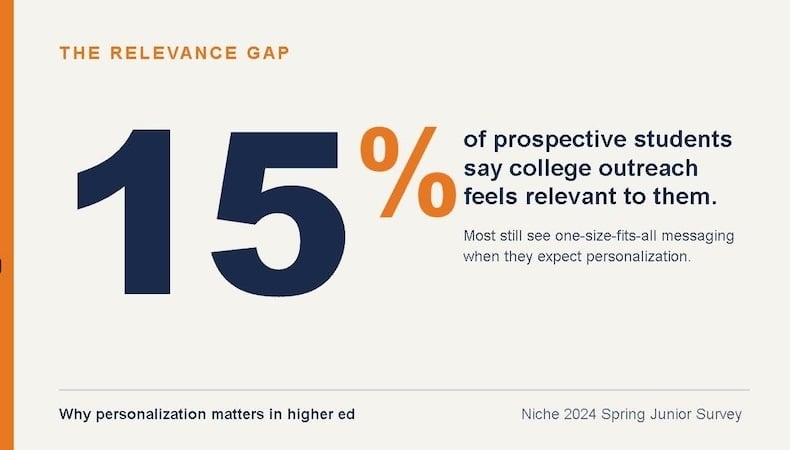
- Only 15% of prospective students say the information colleges send is genuinely relevant to them, signaling a gap between student expectations and current institutional outreach.
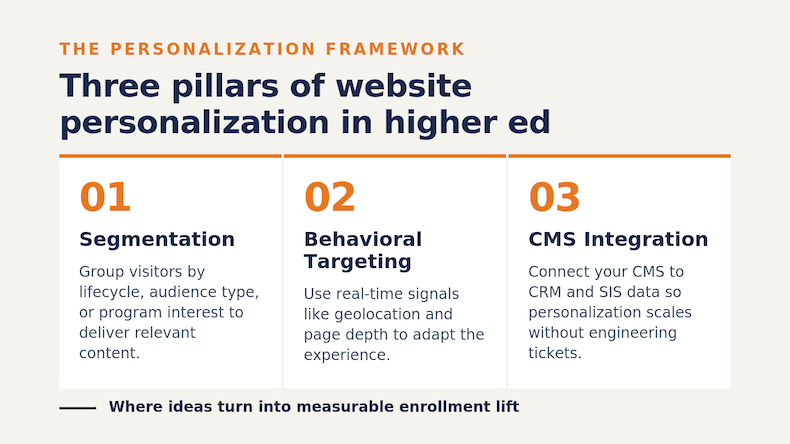
- Segmentation, behavioral targeting and CMS integration are the three pillars that determine whether personalization scales effectively or stalls in pilot mode.
- Real customer outcomes prove the model works: institutions using purpose-built higher ed CMS platforms have seen click-through rates jump from under 1% to over 30% on personalized homepage blocks.
- Privacy-by-design and clean data governance are non-negotiable, especially as third-party cookies disappear and FERPA expectations intensify.
If an institution is still serving the same homepage to a 12th grader, an admitted student and a returning alumni donor, it’s leaving value on the table across the student lifecycle, from recruitment and retention to alumni engagement.
Prospective students arrive on a university website with expectations shaped by Netflix, Spotify and Amazon. They expect the institution to know who they are, what they care about and what step comes next. When a site fails that test, students simply move on to a competitor that doesn't. That's the reality driving website personalization in higher education, and it's why colleges and universities are rethinking how their sites speak to each visitor. According to Niche's 2024 Spring Junior Survey, only 15% of students felt the information colleges were sending was very relevant to them, a sobering benchmark for institutions still relying on one-size-fits-all messaging.
In this guide, you'll learn how universities personalize website experiences for students through smart segmentation, behavioral targeting and Content Management System (CMS) integrations that make scale possible without a corresponding increase in workload.
What Is Website Personalization in Higher Ed?
In higher ed, a personalized website will dynamically adjust the content, calls to action (CTAs), imagery and pathways a visitor sees based on who they are and what they're doing. Rather than serving every visitor the same homepage, a personalized site reads available signals (like geolocation, referral source, pages viewed or stage in the application process) and surfaces content tailored to that individual.
The goal is relevance. A 17-year-old high school junior researching nursing programs needs different information than a working adult exploring a part-time MBA, and both have different needs from a parent searching for housing options. Higher ed personalization makes a site feel like it was built for the person reading it.
How Is It Different from Traditional Web Design?
Traditional web design organizes content for the broadest possible audience and asks visitors to find their own way. With personalization, the site does the work of surfacing what each visitor needs. That can mean swapping a hero image, adjusting a headline, recommending a program or rerouting a CTA. The underlying content management system continually adapts as new behavioral data comes in.
Why Does Website Personalization Matter for Modern Students?
Learners aren't just comparing your university to other universities. They're comparing your digital experience to every consumer brand they interact with. According to a study, 64% of consumers globally prefer to buy from companies that tailor experiences to their wants and needs. Students are willing to share data when the trade-off is a more useful, relevant experience.
The website is often the first, second and tenth interaction a prospective student has with an institution. If a homepage shows the same content on visit one as visit ten, the institution is missing the chance to build momentum toward an inquiry, application or visit.
What Happens When Personalization Is Missing?
When a site doesn't adapt, a few things happen, none of them good. Bounce rates climb because visitors can't find what's relevant fast enough. Inquiry forms go uncompleted because the path forward isn't obvious. And worst of all, prospective students quietly stop returning without ever giving you a chance to follow up. In a market shaped by demographic shifts and intensifying competition, those silent exits add up to real enrollment losses.
What Are the Most Effective Segmentation Use Cases for University Websites?
Segmentation is where personalization becomes practical. Instead of trying to deliver one-to-one experiences from day one, start by grouping visitors into meaningful segments and tailoring content to each. The right segments depend on the institution, but a few use cases consistently deliver outsized results.
How Should You Segment by Student Lifecycle Stage?
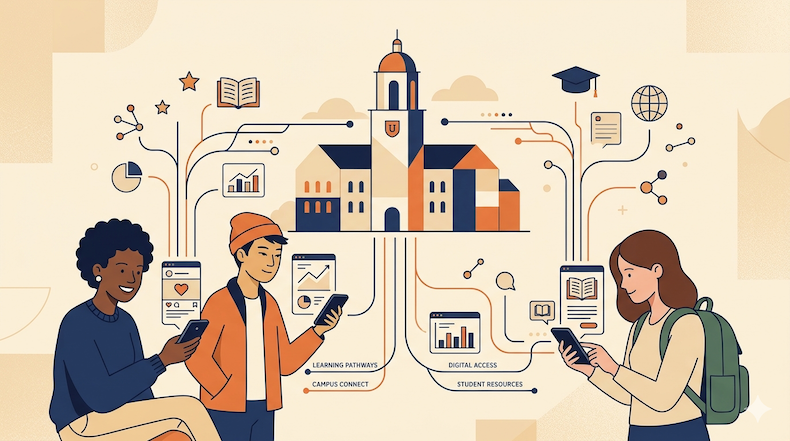
The most foundational segmentation strategy maps to a visitor’s progression on the student journey. A prospective student exploring options needs different content than an admitted student deciding where to enroll, who in turn needs different content than a current student searching for registration deadlines.
For each stage, your site can prioritize a different set of pages, CTAs and proof points:
- Prospects see program highlights, virtual tour invitations and scholarship snapshots.
- Admitted students see deposit reminders and orientation timelines, as well as tools to help them prepare for campus life.
- Current students see registration windows and event calendars, along with advising resources.
Done well, lifecycle-based student journey personalization gives every visitor a reason to come back because the content keeps evolving with them.
How Can You Segment by Audience Type?
Audience-based segmentation is where many institutions see immediate wins. A homepage doesn't need to be everything to everyone. It can quietly reshape itself based on whether the visitor is a traditional undergraduate, transfer student, adult learner, international applicant, parent or alumnus. Each group is searching for different reassurance, proof points and next steps.
Adult learners and continuing education prospects are an especially valuable segment to call out. They're often evaluating non-traditional or workforce-aligned programs, and they need clear information about flexibility, online options, transferable credit and ROI. Generic undergraduate marketing won't move them.
What About Segmenting by Program Interest?
Once a visitor signals interest in a specific academic area, the site has a window of opportunity to deepen the relationship. If someone has clicked into the engineering department twice this week, the homepage can elevate engineering testimonials, related student organizations or upcoming open-house events. This kind of program-level segmentation turns casual browsers into engaged prospects without requiring them to fill out a single form.
How Does Behavioral Targeting Personalize the Student Journey?
While segmentation defines the audience, behavioral targeting defines the moment. It uses real-time signals about how a visitor is interacting with your site to decide what to show next. The strength of this approach is that it works even before you know the visitor's name.
Here are the most useful behavioral signals to act on:
- Visit frequency and recency. A first-time visitor needs a broad introduction. A fifth-time visitor is in evaluation mode, so surface deeper content like detailed program comparisons, testimonials or financial aid calculators.
- Page depth and dwell time. A visitor who reads three pages in an institution’s nursing department is signaling a clear intent. Use that data to elevate a nursing-specific CTA on the homepage on their next visit.
- Geolocation. A visitor browsing from out of state should see different financial aid messaging (and possibly different program promotions) than an in-state visitor. International prospects should see content covering visas, English-language support and the global student community.
- Referral source. Someone arriving from a paid ad about cybersecurity should land on cybersecurity content, not a generic homepage. Honoring referral context reduces friction and bounce.
- Form interactions. A visitor who started but abandoned an inquiry form may benefit from a low-pressure follow-up CTA on their next visit, like a campus tour invitation instead of another form.
These signals work best when they layer. A second-time visitor from out of state who has spent time on four engineering pages is a high-intent prospect, and a site can recognize that pattern and respond accordingly.
Why Does Behavioral Targeting Outperform Static Content?
Behavioral targeting works because it respects time. Students decide quickly whether a site is worth a deeper look, and when the content adapts to what they've already shown interest in, you remove the burden of search. The visitor doesn't have to dig. The information surfaces itself.
Personalization should feel more like a conversation than a brochure. The best personalized university websites listen to small signals and make small adjustments until the experience feels tailored to a particular learner.
How Should a CMS Power Personalization at Scale?
The CMS is where many institutions get stuck. The strategy is clear, the segments are defined, and the behavioral logic makes sense, but the underlying technology can't deliver it. A generic CMS designed for blogs or marketing sites isn't built to handle thousands of pages, hundreds of contributors and dynamic content rules across a sprawling institutional site.
A purpose-built higher ed CMS handles personalization differently. It treats segmentation, behavioral data and content variation as core functionality rather than bolted-on extras. That makes it possible to launch a personalization campaign in weeks rather than months, while maintaining governance over what each segment sees.
What Should You Look for in a CMS Built for Higher Ed Personalization?
A few capabilities separate a CMS that can scale personalization from one that can't:
- Native personalization tooling. Look for content blocks that can be configured with segmentation rules directly inside the CMS, without engineering tickets.
- Customer Relationship Management (CRM) and Student Information System (SIS) integration. ACMS needs to talk to a CRM and SIS so that known-visitor data (such as application stage or program of interest) can drive personalized experiences.
- Decentralized editing with central governance. Higher ed sites have hundreds of contributors. A CMS needs to let them work independently while protecting brand consistency and accessibility standards.
- Built-in analytics. Personalization without measurement is guesswork. A CMS should let practitioners track which variants perform best, by segment, in something close to real time.
Strong higher ed personalization tooling inside the CMS allows a small marketing team to do the work of a much larger one.
How Do CRM and SIS Integrations Strengthen Personalization?
When your CMS integrates with the rest of an institution’s tech stack, personalization gets sharper. A returning admitted student logged into a portal can see deposit reminders pulled from the SIS. A prospect who has filled out an inquiry form can have their CRM record updated automatically when they engage with personalized content. This closed-loop data flow turns surface-level personalization into meaningful student engagement over the full enrollment journey.
What Role Does Privacy Play in CMS-Powered Personalization?
Privacy is a feature. With third-party cookies disappearing and FERPA expectations growing, a personalization strategy needs to lean on first-party data, transparent consent and clean governance. The institutions that get this right will earn the kind of trust that drives long-term enrollment, not just short-term clicks.
What Real Outcomes Are Institutions Seeing from Personalized University Websites?
Real-world examples show what it takes to turn personalization from a strategy into an operational reality.
Eric Hazen, Director of Digital Marketing at Ferris State University, shared a of striking example. After implementing personalization on the FSU homepage, a personalized content block for new student orientation produced a click-through rate of 30.8%, compared to 0.58% for the default version. Across the broader campaign, FSU saw website click-through increase by 2,800% using personalization, all powered by their CMS.
Rice University's Glasscock School of Continuing Studies offers a different angle on the same story. By personalizing program recommendations and course bundles based on student behavior and interests, the school's continuing education unit saw a 35% increase in course enrollments for many of its programs.
The pattern across institutions is consistent: when personalization moves from idea to execution, the lift is dramatic, often in multiples rather than percentages.

What Are the Common Pitfalls to Avoid When Personalizing a University Website?
Personalization done poorly can backfire. Here are a few traps to watch for when building a strategy:
- Stereotyping instead of personalizing. Showing every international student the same generic "international" content treats them as a category, not a person. Instead, layer behavioral data on top of the audience type.
- Overreaching too early. Trying to deliver one-to-one personalization on day one almost guarantees burnout and stalled projects. Start with two or three high-value segments and expand from there.
- Skipping measurement. Without knowing which variants are working, it’s impossible to iterate. Build measurement into every campaign.
- Letting privacy slip. Be transparent about what data is collected and why. Consent, governance and FERPA alignment build the trust that makes deeper personalization possible later.
Frequently Asked Questions
What's the difference between website personalization and CRM-driven email personalization? Email personalization typically targets known contacts in a database. Website personalization works for both known and anonymous visitors, using behavioral signals like geolocation, referral source and page activity to tailor experiences before a form is ever submitted.
How long does it take to implement website personalization?With a CMS purpose-built for higher ed, institutions can launch a first personalization campaign within a few weeks. Broader rollouts typically span a few months as you expand segmentation and add CRM and SIS integrations.
Do you need a large marketing team to make personalization work? No. Many institutions start with a team of one or two and scale from there. The key is choosing a CMS that lets non-technical contributors configure personalization rules without engineering support.
Is website personalization compliant with FERPA? FERPA protects the education records of enrolled students, not anonymous prospective students browsing public-facing websites. As long as your governance is clean, behavioral personalization for prospects can be implemented responsibly. Once a student enrolls, clear consent frameworks are required for any personalization tied to authenticated data.
Build a Website That Works as Hard as Your Admissions Team
Higher ed personalization is a powerful lever for growing enrollment by earning and keeping student attention. The strategy starts with smart segmentation, deepens through behavioral targeting and scales through a CMS designed for the realities of higher ed.
Modern Campus partners with institutions to deliver exactly that, combining a purpose-built CMS with native personalization tools that let your team launch and scale tailored student experiences without fighting your technology. To see how it works at your institution, book a demo with our team today.
Last updated: June 1st, 2026
.png)