University website accessibility has long been a best practice. Now, it’s also a federal mandate with a hard deadline, a clear technical standard and growing legal exposure.
- Public universities must meet WCAG 2.1 Level AA standards by April 26, 2027 (or April 26, 2028 for smaller institutions) under the DOJ's recently extended ADA Title II rule.
- Private universities are not directly covered by the new rule, but they face the same accessibility expectations under Title III, often enforced through litigation.
- More than 95% of websites still have at least one detectable accessibility failure, and education has become one of the top three industries targeted by ADA lawsuits.
- A purpose-built CMS with built-in WCAG checks, automated scanning and enforced publishing rules is the most efficient way to operationalize compliance at scale.
The institutions that move now will turn a compliance burden into a competitive advantage. The ones that wait will be remediating under pressure.
When you think about running a modern higher ed institution, accessibility is rarely the first thing on the list. But it should be top of mind. The U.S. Department of Justice has finalized the most consequential update to digital accessibility law in a decade, and it lands squarely on your university's website, mobile app, course materials and every PDF you publish. University website accessibility is now a federal compliance requirement with a defined technical standard, a real deadline and meaningful legal consequences for institutions that fall short. According to data, 95.9% of websites still have at least one detectable accessibility failure, which means most institutions are starting from behind.
This guide walks through what ADA and WCAG actually require, when institutions have to comply, what a practical compliance checklist looks like and how to build accessibility into day-to-day content operations rather than treating it as a one-time project.
What Does University Website Accessibility Mean in 2026?
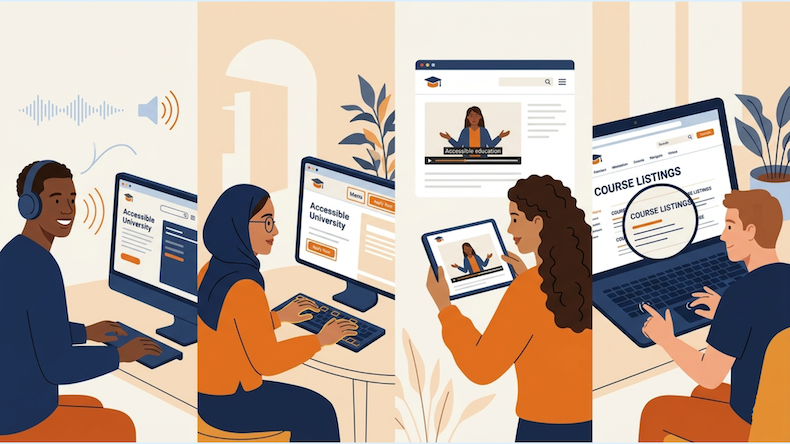
Web accessibility is the practice of designing and building digital content so that people with disabilities can perceive, understand, navigate and interact with it just as easily as anyone else. For universities, that includes everything a prospective or current student touches online.
The number of students affected is substantial. According to federal postsecondary data, 21% of undergraduates and 11% of postbaccalaureate students reported having a disability in 2019–2020, and the rate has continued to climb. When your website is not accessible, you are quietly excluding roughly one in five undergraduates from a fair shot at engaging with your institution. Accessibility barriers like inadequate color contrast, missing captions and dense blocks of text directly damage the user experience for students with disabilities.
There is also a legal dimension. ADA accessibility requirements for university websites have existed for decades, but until recently, the rules for digital content were ambiguous. That changed in April 2024 when the DOJ issued a final rule that named a specific technical standard for university web content: WCAG 2.1 Level AA.
What Do ADA and WCAG Require for University Websites?
Two frameworks govern accessibility for university websites: the Americans with Disabilities Act, which is the federal civil rights law, and the Web Content Accessibility Guidelines (WCAG), which are the technical standards courts and regulators now use to measure compliance. Understanding how they fit together is the first step towards institutional readiness.
How Does ADA Title II Apply to Public Universities?
Title II of the ADA covers state and local government entities, which means it applies to all public colleges and universities. Under the April 2024 final rule, public higher ed institutions must ensure that their web content and mobile applications comply with WCAG 2.1 Level AA. The rule isn't limited to your homepage. It covers your full digital ecosystem, including:
- Program pages
- Application forms
- Financial aid portals
- Online courses, PDFs
- Lecture videos
- Student services portals, and
- Social media posts published after the compliance date
There are five limited exceptions where content does not have to meet WCAG 2.1 Level AA standards:
- Archived web content
- Preexisting conventional electronic documents
- Third-party content
- Individualized password-protected documents, and
- Preexisting social media posts
But these exceptions are narrow. The moment a student with a disability requests access to archived material, institutions may still need to provide an accessible version or reasonable accommodation.
What About Private Universities Under Title III?
Private institutions fall under ADA Title III, which has not yet adopted a specific technical standard. Private colleges aren't off the hook. Courts and settlements consistently treat WCAG 2.1 Level AA as the de facto benchmark, and private institutions face direct litigation risk from individuals and advocacy groups. The practical reality is that both public and private universities should be working toward the same standard.
What Is WCAG 2.1 Level AA?
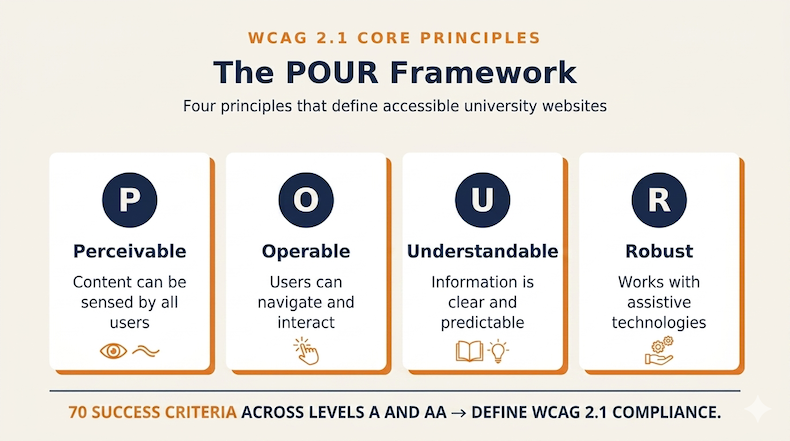
WCAG 2.1 is a technical standard published by the World Wide Web Consortium. It is built around four principles, often summarized by the acronym POUR, meaning that content must be Perceivable, Operable, Understandable and Robust. Level AA includes all 50 success criteria at Level A and 20 additional criteria at Level AA, for a total of 70 testable requirements. These criteria address everything from color contrast and alt text to keyboard navigation and screen reader compatibility.
Worth noting: WCAG 2.2 was published in 2023 and adds nine new success criteria. The DOJ's rule still references 2.1, but institutions that target 2.2 conformance are future-proofing their sites against the next regulatory update.
When Are Universities Required to Comply With the New ADA Rule?
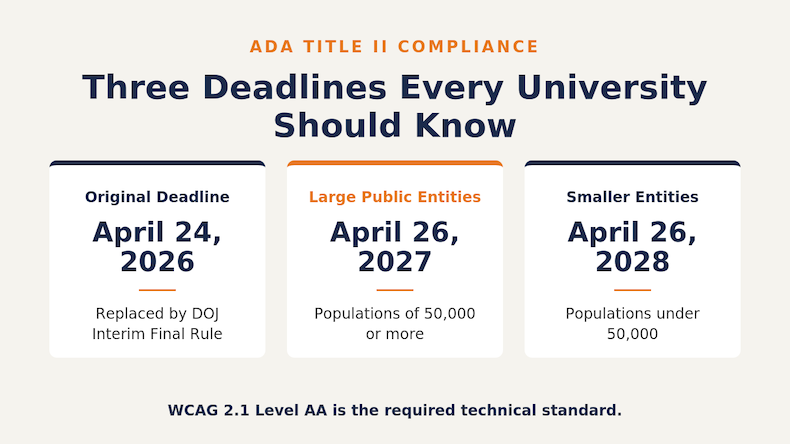
The deadlines have just shifted, and most institutions are still unaware. On April 20, 2026, the DOJ issued an Interim Final Rule extending compliance deadlines by exactly one year. The compliance date for state and local government entities with a total population of 50,000 or more was extended from April 24, 2026 to April 26, 2027. Public entities with a total population of less than 50,000, or any special district government, now have until April 26, 2028.
The DOJ explained that many public entities had raised concerns about lacking the technical and personnel resources to update their content in time, and the rule notes that current technologies, including generative AI, can't yet automate accessibility remediation at scale. The technical standard, scope of covered content and underlying obligation to provide accessible digital services have not changed. The only thing that’s changed is the date.
That extra year is a chance to build a sustainable accessibility operating model rather than scrambling. The gap between where most institutions are and where they need to be is still substantial, and most universities will need the full extension just to audit, remediate, train staff and establish ongoing governance.
What's at Stake if Your University Website Isn't Accessible?
The risk of inaccessibility shows up in legal exposure, enrollment impact and institutional reputation. Each one alone justifies investment. Together, they make accessibility one of the highest-ROI digital initiatives your institution can pursue.
The legal exposure is real and growing. Roughly 4,000 ADA-related digital accessibility lawsuits were filed across state and federal courts in 2024, with education consistently ranking among the top three industries targeted.
The enrollment impact is just as significant. Prospective students with disabilities who can't navigate your site, complete your application or read your program pages will simply choose another institution. With higher ed already facing an enrollment cliff, alienating any segment of your prospective student population is a mistake.
The reputational cost rounds out the picture. Accessibility complaints generate negative press, attract regulatory attention and undermine recruitment messaging that emphasizes inclusivity and student support. Your accessibility is part of your brand, whether you treat it that way or not.
What Does a University Website Accessibility Compliance Checklist Look Like?
Compliance is more achievable than it looks if you break it into discrete, ownable tasks. Here is a working checklist your team can start using today, organized by category and aligned to WCAG 2.1 Level AA.
Perceivable (can users sense your content?):
- Add meaningful alt text to every image, chart and graphic that conveys information
- Ensure color contrast ratios of at least 4.5:1 for normal text and 3:1 for large text
- Provide captions for all pre-recorded video content and transcripts for audio content
- Avoid using color alone to communicate meaning (e.g., red text for required fields)
- Make sure text resizes properly up to 200% without breaking the layout
Operable (can users interact with your content?):
- Confirm every interactive element works with keyboard-only navigation
- Add descriptive link text rather than "click here" or "read more"
- Provide visible focus indicators so keyboard users can see where they are
- Avoid auto-playing media or content that flashes more than three times per second
- Build a logical heading structure (H1, H2, H3) without skipping levels
Understandable (can users comprehend your content?):
- Declare the page language in HTML so screen readers pronounce content correctly
- Use plain language and define technical terms when they appear
- Make form errors clear, specific and easy to correct
- Keep navigation patterns consistent across pages
- Label every form field with a visible, descriptive label
Robust (does your content work with assistive technology?):
- Use semantic HTML so screen readers can interpret the structure correctly
- Apply ARIA accessibility labels and attributes thoughtfully and only when native HTML can't do the job
- Test with at least one screen reader (NVDA, JAWS, or VoiceOver)
- Validate that custom components announce status messages to assistive tech
- Audit PDFs and downloadable documents using accessibility checkers
Beyond these specific success criteria, federal accessibility guidance recommends that institutions also build out the operational layer, which includes:
- An accessibility committee with budget authority
- A designated web accessibility coordinator
- Training for content creators
- Accessibility requirements written into procurement contracts, and
- A documented remediation roadmap tied to the new deadlines
Compliance lives in the workflow, not the audit report. For institutions still figuring out where to begin, this guide on improving web accessibility walks through a practical first-pass audit approach.
What CMS Accessibility Features Make Compliance Sustainable?
Manual auditing alone will not get a complex university site into compliance and keep it there. Content moves too fast, departments publish too independently, and human error compounds quickly. A purpose-built CMS for higher education embeds accessibility checks into the publishing workflow itself.
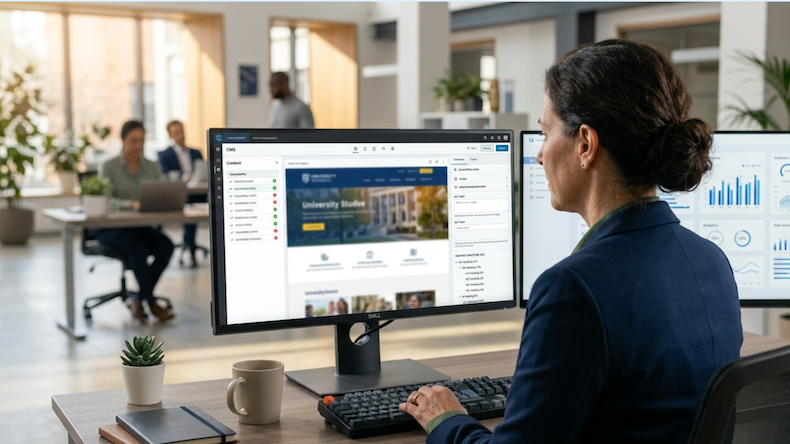
Look for these CMS accessibility features when evaluating your platform:
- Automated WCAG scanning that flags issues across the entire site rather than page by page
- Real-time feedback during content creation so editors see problems before they publish
- Enforced alt text fields that prevent images from being inserted without descriptions
- Heading structure validation that catches skipped heading levels and broken semantic hierarchy
- Color contrast checking built into the design and template system
- Pre-publish accessibility gating that blocks non-compliant pages from going live
- Centralized template management so a single fix propagates across thousands of pages
- Automatic standards updates so your platform stays current as WCAG evolves
The reason these features matter is governance. Web accessibility is legally mandated and ethically essential, and institutions need tools that automatically scan for accessibility compliance while preventing non-compliant content from being published. Without enforcement at the platform level, every new department, content editor and microsite becomes a fresh opportunity for compliance to drift.
Generic CMS platforms can be configured for accessibility, but they weren't built for it. Higher ed CMS platforms designed around accessibility from the ground up reduce the burden on your IT and marketing teams and shrink the surface area where things can go wrong.
Frequently Asked Questions About University Website Accessibility
Are private universities required to comply with WCAG 2.1 Level AA? Private universities are governed by ADA Title III, which does not yet specify a technical standard. However, courts and settlements consistently use WCAG 2.1 Level AA as the benchmark, and many private institutions face direct lawsuit risk. Many are working toward the same standard as their public peers.
What happens if a university misses the ADA Title II deadline? Failure to comply can result in DOJ investigations, Office of Civil Rights complaints, lawsuits from individuals or advocacy groups and required corrective action plans. Settlements often include monetary damages plus mandated remediation, monitoring and ongoing reporting.
Do accessibility overlays or widgets satisfy WCAG compliance in higher ed? No. According to research, 25% of all lawsuits in 2024 explicitly cited overlay widgets as barriers rather than solutions. Compliance requires fixing the underlying source code and content, not layering on a tool.
Does WCAG compliance apply to PDFs and other documents on my university website? Yes. Any PDF, Word document, presentation or spreadsheet used to deliver institutional services or programs must meet accessibility standards. The exception for preexisting conventional electronic documents is narrow and disappears the moment the document is updated or actively used.
How long does it take to bring a university website into WCAG 2.1 Level AA compliance? Timelines vary based on site size and current accessibility posture, but most institutions need 12 to 24 months to audit, remediate, train staff and establish ongoing governance. Starting now puts you ahead of the new April 2027 deadline.
How Should Your University Approach the Next Phase of Accessibility Compliance?
The April 2027 deadline is closer than it sounds, especially when you account for auditing, remediation, staff training, vendor renegotiation and the inevitable surprises that come with legacy content. The institutions that will come out ahead are the ones treating accessibility as a continuous operating model rather than a one-time fix, and that starts with the platform powering your website.
Modern Campus offers a purpose-built higher education CMS with automated WCAG 2.1 scanning, accessibility enforcement at the publishing layer and centralized template management designed to keep your institution compliant as content scales. To see how it can simplify your path to ADA compliance, book a personalized demo with our team.
Last updated: May 28, 2026
.png)
.png)